
|
|
Most of you are probably familiar with the word game BoggleTM. The board is a 4x4 grid onto which you shake and randomly distribute 16 dice. The dice have letters rather than numbers on the faces, creating a grid of letters from which you form words.
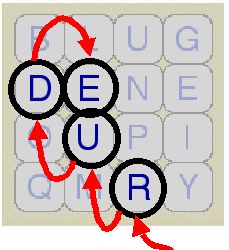
A player has 3 minutes to find as many words as possible, by tracing a path through adjoining letters. Two letters adjoin if they are next to each other horizontally, vertically, or diagonally. There are up to eight letters adjoining a cube. A tile can only be used once in each word.
Your assignment is to implement a program which allows a user to play BoggleTM. Your program should randomly generate a realistic BoggleTM board, then give the user 3 minutes to find as many words as possible. The program will then score each word based on its length:
Any word which cannot be found on the board or is not in the dictionary, will receive 0 pts. If a user enters the same word more than once, it should not be scored twice. If a word receives 0 pts the program should display a reason. For example:
After the user's words have been scored the program should display all the words that he missed and their total value. It should also ask the user if he wants to play again.
You can earn bonus points for implementing the following optional feature:
Your program will be graded on its conformance to the style guidelines for this class, and its adherence to the requirements listed in this assignment. Here is the gradesheet that will be used:
A demo for this program can be found here. Please download the appropriate file depending on whether you are logged into wopr or a lab machine. Using a terminal window, navigate to the directory where you saved it. Then change the permissions of the file to make it executable. For example, if you downloaded the lab version you would type the following to make it executable:
chmod u+x project_demo_lab
This only needs to be done one time. To run the demo type:
./project_demo_lab
You can run it as often as you like. You should use the demo to get familiar with the assignment and also to get an idea of what your output should look like. Your program does not have to look exactly like the demo, however you should use it as a standard of what I expect when grading. A portion of your grade will be based on how the program output is formatted.
To submit your program, first navigate to the directory which contains it, then type 'submit' at the command prompt. A menu will appear with instructions. Your program should be in multiple files for this assignment and you should submit all .C and .h files. You will also need to submit a Makefile. You do not need to submit the dictionary.txt or dice.txt files because I will use my copies. So make sure your program reads from files with those names.
I will not be accepting hard copies (printouts) in class. Your program must be received by the date and time stated at the beginning of the assignment. The time will be based on the system time of the machine from which you are submitting. To find out the system time of a machine, type the command 'date' at the prompt.